lexisOS
Setting things up…
Setting things up…
CRM, LinkedIn prospecting, a shared email and SMS inbox, scheduling, and workflow automation — one composable workspace instead of six disconnected tools.
Most sales stacks are a CRM plus a LinkedIn tool plus a sequencing tool plus an inbox plus a calendar app, each holding a different piece of the same deal. LexisOS keeps them as one system: a lead scraped from LinkedIn becomes a CRM record without a re-entry step, every channel a rep uses — email, LinkedIn, SMS, voice — rolls into that same record's timeline, and the modules you don't need stay off.

A lead comes in from LinkedIn. It gets copied into the CRM by hand. The follow-up email goes out from a different tool that doesn't know the CRM stage changed. The reply lands in a personal inbox nobody else on the team can see. By the time the deal is worth reporting on, three systems have three different versions of what happened — and reconciling them is a task nobody put on the calendar.
That's the tax composability is meant to remove: not a missing feature, but a missing connection between the features you already have.
LexisOS is built from four pillars, and every module on this site traces back to one of them.
Shape the system to your business, not the other way around.
Detect role changes, company changes, and keyword mentions in LinkedIn posts, then let a workflow act on them.
Reach through LinkedIn, email, SMS, and voice, from one shared inbox per channel — Gmail, Microsoft 365, and IMAP mailboxes converge into a single inbox; SMS is a two-way team inbox with MMS; voice calling and recording ride on your own Twilio account.
You decide what sends itself. Mark any email, LinkedIn message, or SMS step "needs approval" and the draft waits in Drafts until a person signs off.
A tab for each surface that makes LexisOS feel different. Three of them are real screens, captured from a working workspace on demo data. The rest are diagrams of screens we have not photographed yet — we would rather show you a diagram than a mockup dressed up as a screenshot.
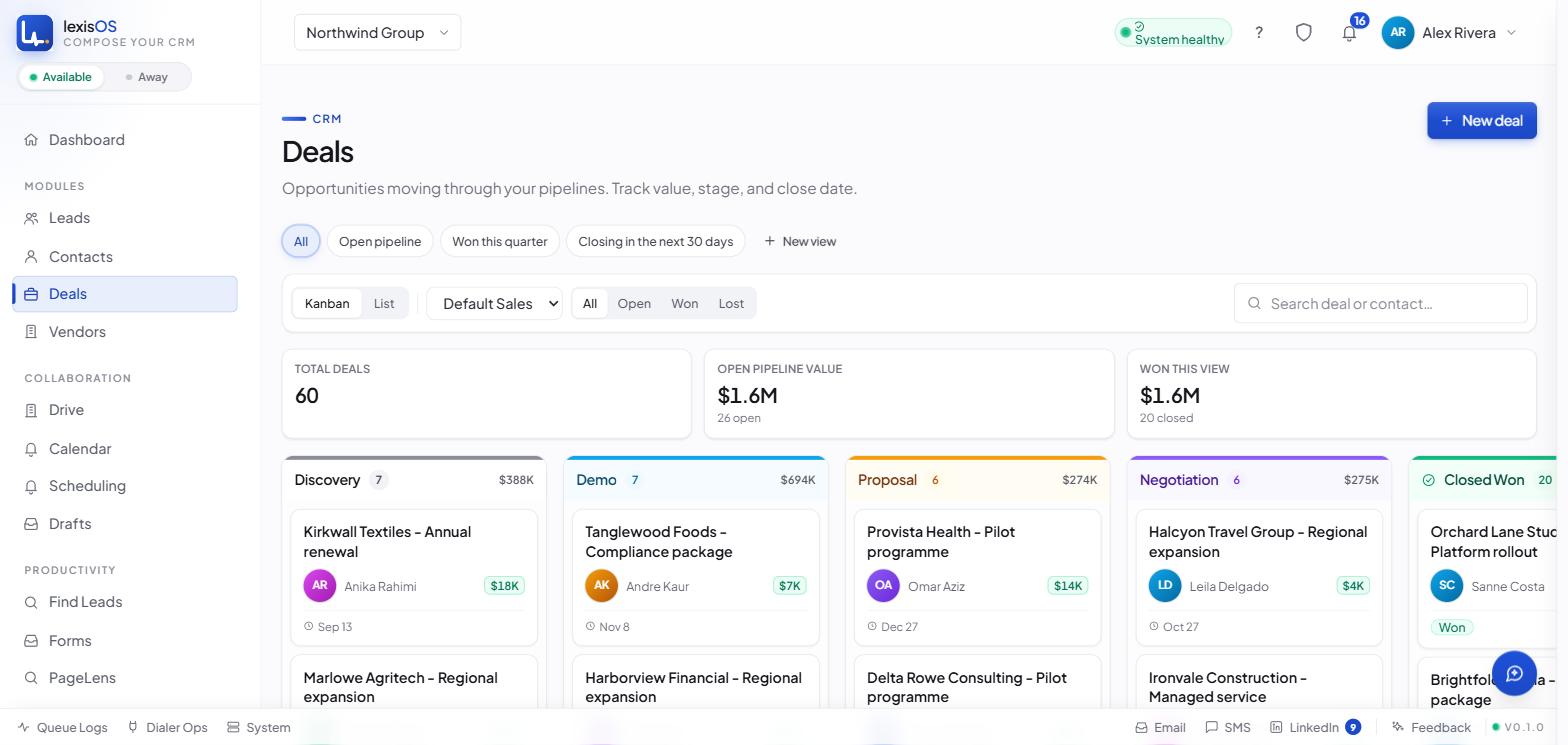
Leads, Contacts, Deals and Vendors are full record types, each with its own custom fields and tags. Deals open on a drag-and-drop board, and every stage column carries its own count and its own running total — both move with the card.
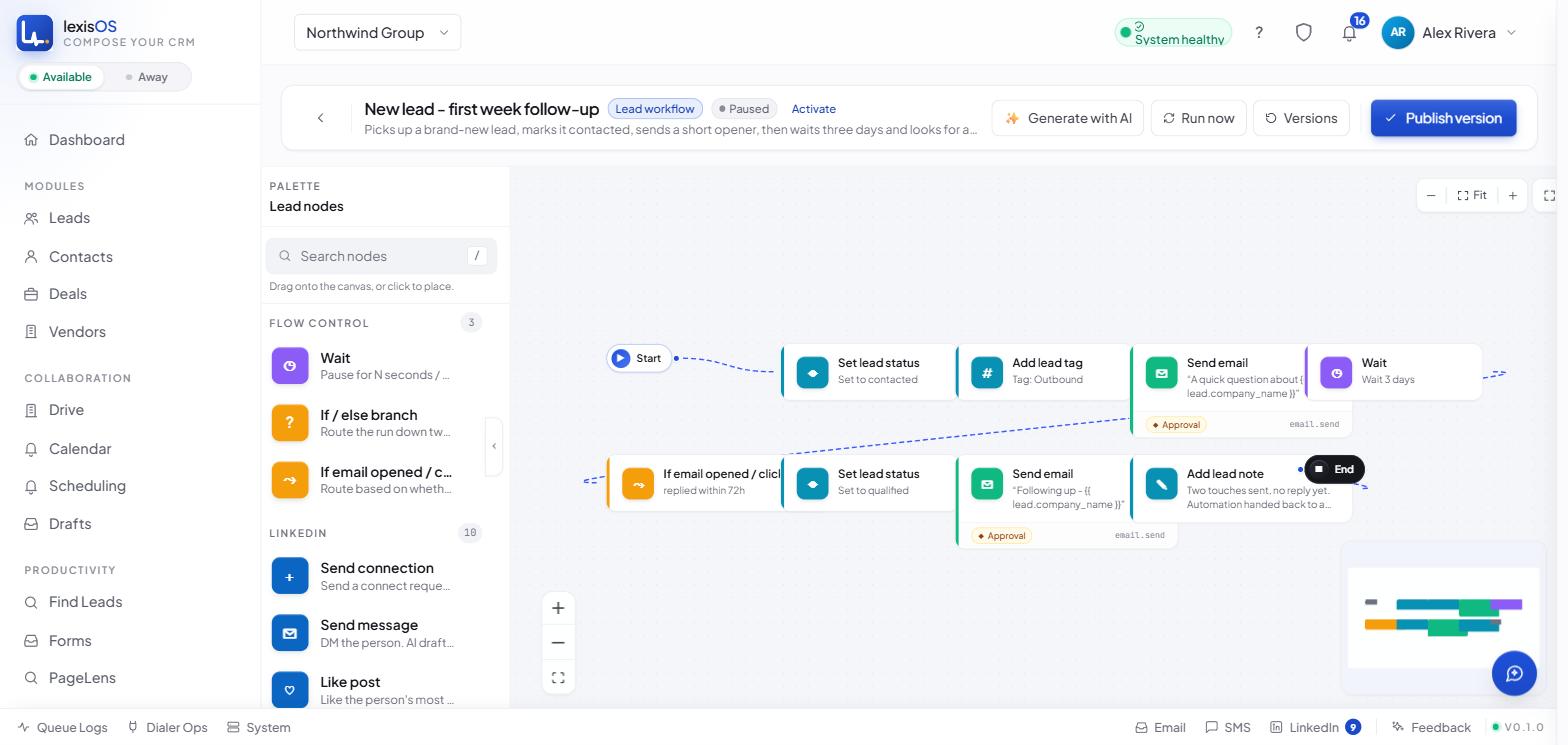
Drag steps off the palette and branch them — set a status, add a tag, send an email, wait three days, then check whether it was opened. Both email steps on this canvas are marked approval-required. That is the badge on the node: the step drafts the message, then the run holds until a person signs off. You choose it per step.
A three-pane email client that actually merges Gmail, Microsoft 365, and IMAP mailboxes into one thread list, with live per-mailbox sync progress.
A public booking page a prospect books directly: mini-calendar, slot grid, and an animated confirmation, comparable to a dedicated booking tool.
A live, streaming site-audit run: an animated progress ring and a timestamped activity log while the crawl and the AI-fix drafting happen.
Six KPI tiles across the top — open pipeline, revenue won, win rate, average deal size, sales cycle, new leads — over whatever period you pick: a week, a month, a quarter, a year. Add a KPI of your own, or rearrange the layout. "Your day" gathers what is overdue, what is due today, and what nobody owns yet.
LexisOS doesn't read LinkedIn's pages, and there is no robot browser running somewhere in the background. A paired Chrome extension calls LinkedIn's own API from inside your logged-in tab, using your session. That's how scraping works — profiles, companies, search results, posts — and it's how all ten LinkedIn actions execute: connect, message, like, comment, post, visit profile, follow, unfollow, withdraw invite, and endorse skill. Connect and message can also run server-side through your account's stored session; the other eight are architected to run only through your own paired browser, by design — LinkedIn treats those as riskier coming from anywhere but a real session.
Every account gets admin-configurable daily and weekly caps per action type, enforced at the moment work is claimed rather than after the fact. A live LinkedIn DM inbox sits inside the product too — read and reply without leaving LexisOS, refreshed on demand rather than polling automatically, because constant polling from outside LinkedIn's own client is exactly the pattern that gets a session flagged.
“AI drafts. A person approves. Every time.”
An email, LinkedIn message, or SMS is written and attached as a Draft.
The run stops and waits. The pause is enforced by the workflow itself.
Edit, approve, or reject the draft before anything leaves LexisOS.
Delivery respects your account's daily and weekly action caps.
Every send step in a workflow carries its own approval setting. Mark a step "needs approval" and the AI-drafted email, LinkedIn message, or SMS is written, then held as a Draft while the run waits for someone on your team to sign off — that pause is enforced by the workflow itself, not by the interface. Mark it "send automatically" and it goes out under your account's caps. The choice is per step, and it is yours. The in-app AI assistant follows the approval pattern for changes to your data: it reads your CRM to help you, and if you ask it to change something, it hands off to a bounded proposal step and waits for your approval before anything executes.
Generation works out of the box under a platform-set cap. Bring your own Anthropic API key any time for a monthly spending cap your admin sets instead. Every system prompt behind these drafts is stored and editable, not hidden in application code.
LexisOS exposes itself as a real external MCP server — 248 registered tools across 24 categories, from CRM records to LinkedIn actions to workflow runs. Authentication is genuine OAuth 2.1 with dynamic client registration and PKCE, the same standard Claude Desktop expects from a first-class connector, not a bespoke API key workaround. Every mutating call is audit-logged and carries a short-lived undo token.
| Capability | Detail |
|---|---|
| Tools registered | 248 tools across 24 categories |
| Authentication | OAuth 2.1 with dynamic client registration and PKCE |
| Every write | Audit-logged, with a short-lived undo token |
| MCP-only today | Merging duplicate people; viewing the deals kanban programmatically |
Every integration below is a confirmed, working connection — not a logo on a roadmap slide.
CRM sync (two-way) — Zoho CRM, HubSpot
Push and pull, field mapping, conflict resolution.
Email — Gmail, Microsoft 365, any IMAP mailbox
One unified inbox.
Calendar — Google Calendar, Microsoft 365 Calendar
Two-way sync.
Meeting links — Zoom, Zoho Meet
Created automatically when a booking page is used.
Messaging & voice — Twilio
SMS, MMS, and browser calling on your own Twilio account.
Sites — WordPress
PageLens can push an approved fix live to a connected WordPress site.