One platform, not five logins
September 22, 2026
Most sales stacks aren’t built. They accumulate. A CRM for records, a LinkedIn tool for prospecting, a sequencer for outreach, a separate inbox for replies, and a spreadsheet holding the whole thing together because none of the other four actually talk to each other. Every new hire spends their first week just learning where things live.
The problem with the modern sales stack
Each tool in that stack is usually fine on its own. The cost shows up in the seams — the lead that gets scraped in one tool and re-typed into another, the reply that lands in an inbox nobody on the deal is watching, the approval that happens over Slack because the sequencing tool has no concept of “wait for a person to check this first.”
None of that is a feature gap you can fix by buying a sixth tool. It’s what happens when prospecting, the CRM record, and outreach live in different systems that were never designed to agree with each other.
What “one platform” actually means here
LexisOS isn’t a CRM with some integrations bolted on. It’s one system where these are switches on the same record, not separate products with separate logins:
CRM — Leads, Contacts, Companies, Deals, and Vendors, with custom fields, saved views, and configurable pipelines.
LinkedIn prospecting and actioning — through your own paired browser session, not a bot account, with admin-set daily and weekly caps enforced before a job is even claimed.
Workflows — a visual builder with roughly 30 step types across LinkedIn, email, SMS, and CRM actions.
AI drafting — writes the message; it never decides on its own to send it.
A unified inbox — Gmail, Microsoft 365, and any IMAP mailbox, converged into one three-pane view.
Find Leads — people, company, and local-business search, fully managed, with the credit cost shown before you spend it.
A profile you scrape on LinkedIn becomes a Lead with no re-typing. A reply lands on that same record’s activity feed, not in an inbox three people have to remember to check. That’s the actual product bet: not one more feature, but fewer seams for a deal to fall into.
The part most tools get wrong
Automation earns trust slowly and loses it in one bad send. So every send step in a LexisOS workflow carries its own approval setting — not a global toggle, a per-step one — and that pause is enforced by the workflow engine itself, not by a setting someone can quietly switch off.
Draft it. Don’t send it — not until a person says so.
Mark a step “needs approval” and the AI-drafted email, LinkedIn message, or SMS gets written, then held as a draft while the run waits for a teammate to sign off. Mark it “send automatically” and it goes out under your account’s caps. The choice is per step, and it’s yours — not a default LexisOS made for you.
What this looks like, step by step
You scrape a LinkedIn profile, or it surfaces through a Find Leads search.
It becomes a Lead automatically — no copy-paste, no second system to update.
A workflow drafts the outreach: a connection request, a message, or an email, depending on how you built it.
If that step needs approval, it waits as a draft. If it doesn’t, it sends under your caps.
The reply — wherever it comes in from — lands on that same Lead’s record, not in a separate inbox.
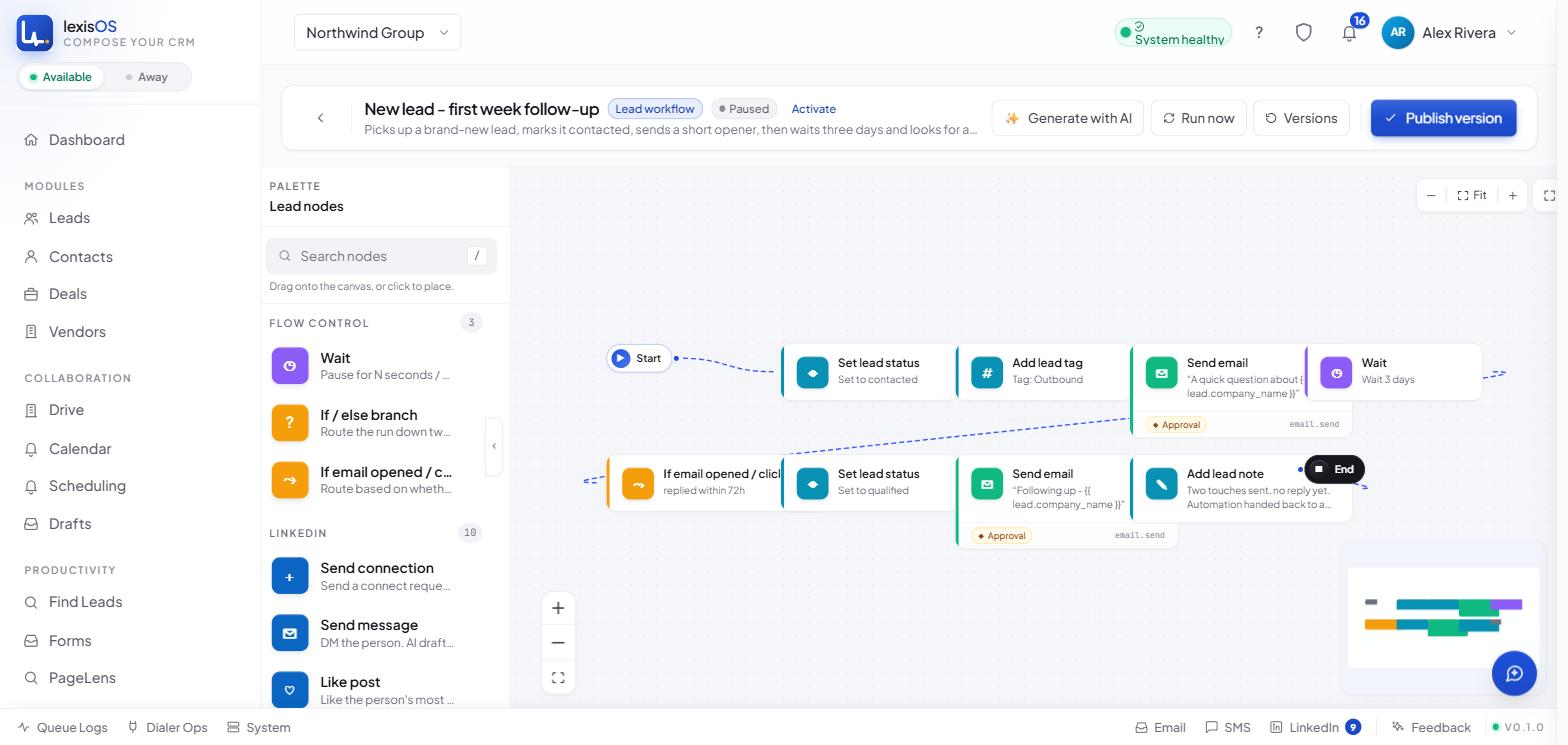
The workflow builder — every step decides for itself whether it sends automatically or waits for a person.
Nothing here is a bot working unattended in the background. It’s the parts of the job that were always mechanical — copying a profile into a record, remembering to follow up, checking three inboxes — handled so the parts that need a person still get one.
Start where it’s actually useful
You don’t have to turn all of this on at once. CRM and LinkedIn alone is a complete starting point for a lot of teams — add a mailbox, a workflow, or Find Leads the day you actually need it, not before.